Call Detail Record
Document Metadata
Category: Carrier Management / Call-Detail Records (CDR) & Reporting
Audience: Administrators, Engineers, Support & Analytics Teams
Difficulty: Intermediate
Time Required: Approximately 30–45 minutes
Prerequisites: Active ConnexCS account with Carrier-module access; familiarity with call detail records (CDRs), routing analytics, and reporting workflows
Related Topics: Carrier Stats, Carrier Latest Calls
Next Steps: Navigate to the
Carrier → CDR tab, review and download call-detail records for the carrier, and use the Recalc function when data appears incorrect (note: rerating is irreversible)Management Carrier CDR
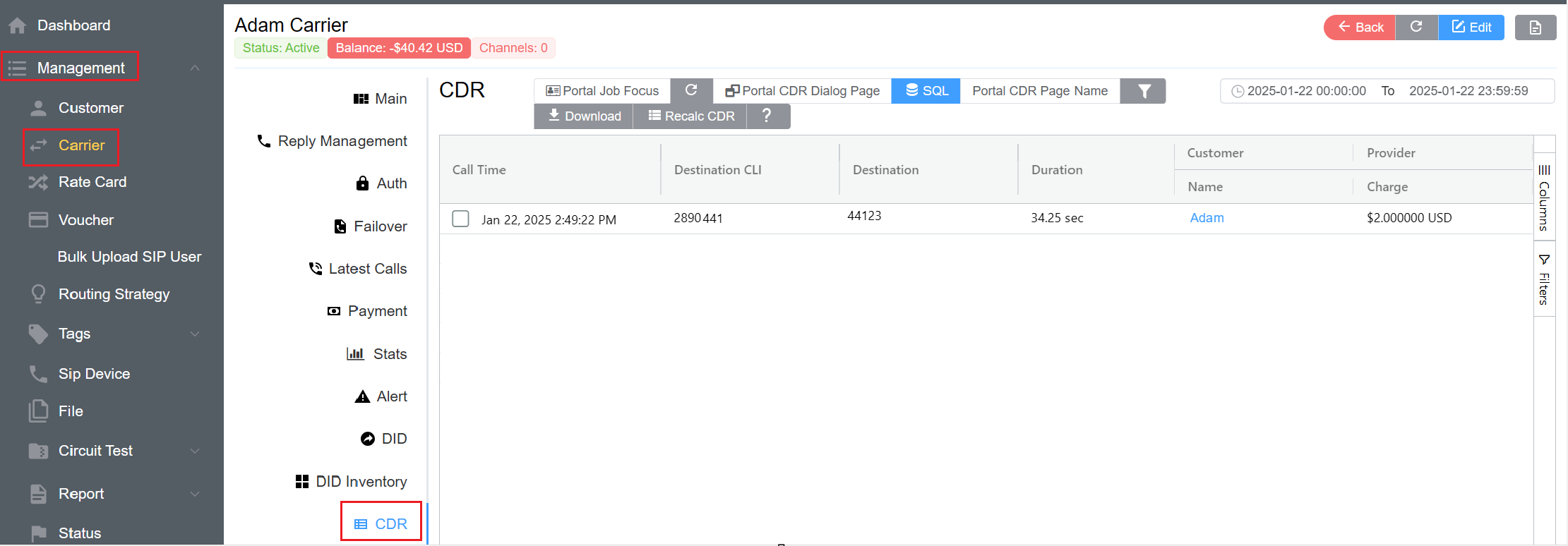
The CDR (Call Detail Record) is an extensive set of information that's collected and stored for each call. This is primarily used for billing purposes as it contains details such as call duration and destination number.
Global CDR
View CDRs for all Customers and Carriers in Global CDR.
Download and recalculate selected CDRs across several customers.
Available Options
The Carrier CDR tab lists Call Detail Records associated with the selected account. Select the entries to display more detailed information. The created queries on the server get displayed on the portal.
- Columns: Customize your view by enabling or disabling additional CDR fields from the Columns panel on the right. This allows you to display only the information relevant to your analysis.
- Filtering and Sorting: Click a column header to filter or sort the displayed records. Since each call generates a separate CDR, this feature is especially useful for customers handling high call volumes, helping you quickly locate specific calls or trends.
- Download: Click Download to export the CDRs in CSV format.
- SQL Query: Use the SQL Query option to execute custom queries directly within the portal. This enables advanced data filtering, reporting, and analytics tailored to your requirements.
Recalculate Call Detail Record
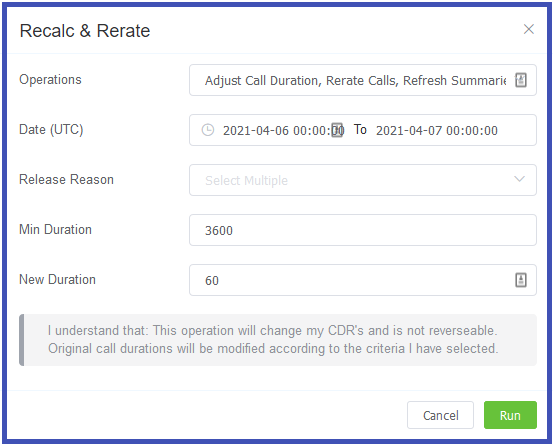
When viewing CDRs for a specific carrier, use the Recalc CDR button to refresh CDR data that may be inaccurate. Each Operation displays different fields.
-
Operations
- Refresh Credit (recalculates balances)
- Refresh Summaries & Credit
- Re-rate Calls, and Refresh Summaries & Credit
- Adjust Call Duration, Re-rate Calls, and Refresh Summaries and Credit
-
Date (UTC) (for Refresh operations)
-
Release Reason (for Re-rate operations)- Select the reason for the call's termination (multiple selections allowed). This will revise the amount charged for the calls.
-
Min Duration (for Adjust Call Duration operations) (Minimum Duration of calls that will be considered for re-calculation (3600 seconds))
-
New Duration (for Adjust Call Duration operations) (All the calls with minimum duration of 3600 seconds will be recalculated with the value in the New Duration, for example 60 seconds).
Example
| Duration(seconds) | Cost per second($) | Total Cost($) |
|---|---|---|
| 3600(minimum duration) | 0.0001 | 0.36 |
| 60(new duration) | 0.0001 | 0.006 |
See Customer CDR for details.
Rerating CDRs
If you select either "Rerate" options when recalculating CDRs, this will change your CDRs and isn't reversible.
Original call durations get modified according to the selected criteria.
Query Builder
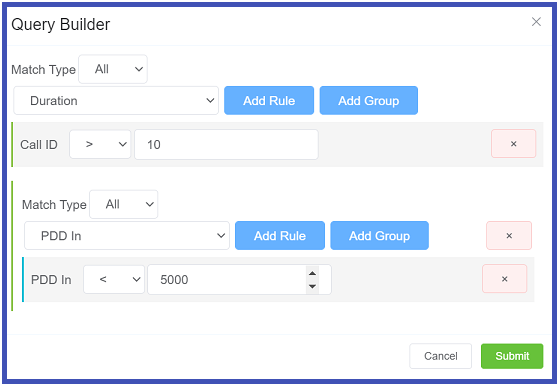
Create advanced filters using any fields of the record. Select either Origination or Termination, or use the Query Builder to customize the data view.
- Match Type: Select "All" or "Any" calls to match.
- Select the CDR field from the drop-down, then "Add Rule" to define parameters to match.
- Select Add Rule to select extra fields and parameters to include in the custom query.
-
Use Add Group to group sets of queries into a series of groups, creating complex, compound, and multi-vector queries.
Using Query Builder with large amounts of data
It's recommended not to run detailed and complex queries on large amounts of data. It's better to write more compact and pared down queries to retrieve this data.
Unlike other providers, ConnexCS doesn't use CDRs for debugging.
You should be able to do all your debugging in the Logging section.
Call Detail Record Time Zone
You can view the rated CDR's stored in UTC; day-to-day totals are also calculated in UTC. You can change the time zone of individual CDR records viewed from the time zone selector, but downloads will always be in UTC.